Braden Kovalovich

B.S. in Game Development and Production from Drexel University

Hi there! I’m a game programmer who specializes in making games fun. I've been passionate about games since before I could spell the name of the state I live in. (Pennsylvania, age 5)Below you can find examples of my work and the tools I've used. Feel free to reach out using the email given above!


Technical Lead, TIMEWORKS

Unity - Nov '22 to Apr '24 - 16 person team

I led implementation of primary systems for
Timeworks, an award winning 3D puzzle game.

Video

Programmer, 4th Terra

Unity - Sept ‘23 to Mar ’24 - 17 person team

I continued development of the educational game 4th
Terra, designing features using feedback gathered from pilot schools.

Video

Technical Lead, Boast Guards

Unity - Sept '24 to June '25 - 20 person team

I led implementation of primary systems for a
competitive co-op game inspired by Overcooked.

Video

Programmer, BONED

Unity - Sept '24 to June '25 - 20 person team

I implemented UI and tertiary systems for a four player arcade vs game inspired by Killer Queen.

Video

Languages
• C#/.NET
• C++
• Python
• Javascript
• Lua
• GDScript

Engines/Tools
• Unity
• Unreal
• Godot
• Monogame
• Version Control (Perforce, Git, PlasticSCM)

Unity Experience
• Inspector Scripting (Scriptable Objects, Editor Windows)
• Physics System (character controllers, raycasting, collision systems, etc)
• Input (Unity input, touchscreen controls)
• Asynchronous Programming (Coroutines, C# asynchronous functions)
• Level Design (greyboxing, ProBuilder)
• Camera Systems (Cinemachine, Splines)
• UI Programming (DOTween, custom UI systems)
• Animation (2D/3D, Vicon Motion Capture, importing assets)
• Lighting (Baked, static, Post Processing )
• VFX (Unity Particle System, VFX Graph)
• Sound (Wwise, custom sound systems)
• Shaders (HLSL scripts, ShaderGraph)
• Enemy AI (Navmesh, State Machines, Behavior Trees)
• Procedural Generation (levels, game environments)
• Save systems (JSON, EasySave3)
• Optimization (Profiler, Burst)
• Deployment (Windows, WebGL, IOS, Android)


Contact me!


Emote System - Timeworks

Timeworks is a unique game that challenges players to think both spatially and temporally. From inception through release, our greatest design challenge was making fourth-dimensional traversal feel as intuitive as possible so players could focus on solving puzzles. Even late in development, playtesting revealed that our systems still weren’t meeting players halfway.

To address this, I concepted, designed, and implemented the Emote System. Its purpose was to provide a straightforward way to mark a clone’s progress in time and make coordinating actions easier.

It consists of three parts:
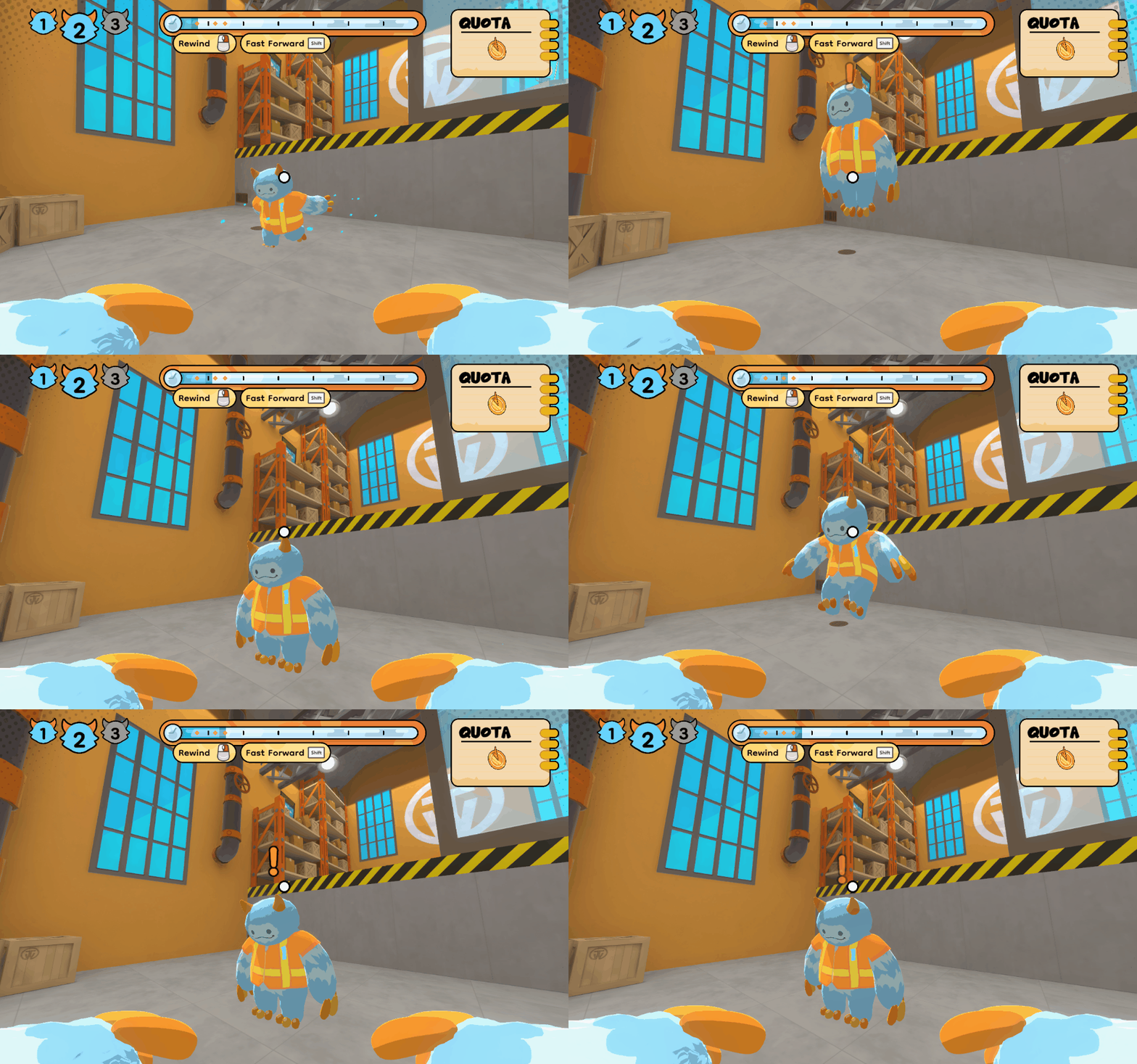
Visuals - Clones display an exclamation point above their heads.
Sound - A whistle sound is played, a universally understood cue for “Look over here!”
UI - A marker is placed on the overhead time bar, persisting even if a player returns to a previous loop.

The feature was simple enough to quickly add to our existing systems:

The system is lightweight and easy to understand, allowing players to use it however they like. After implementation, we noticed our best players citing the Emote System as essential for solving the more challenging puzzles. This experience taught me the value of designing outside the box and minimally when a project is late into development.

Level Greyboxing - Timeworks

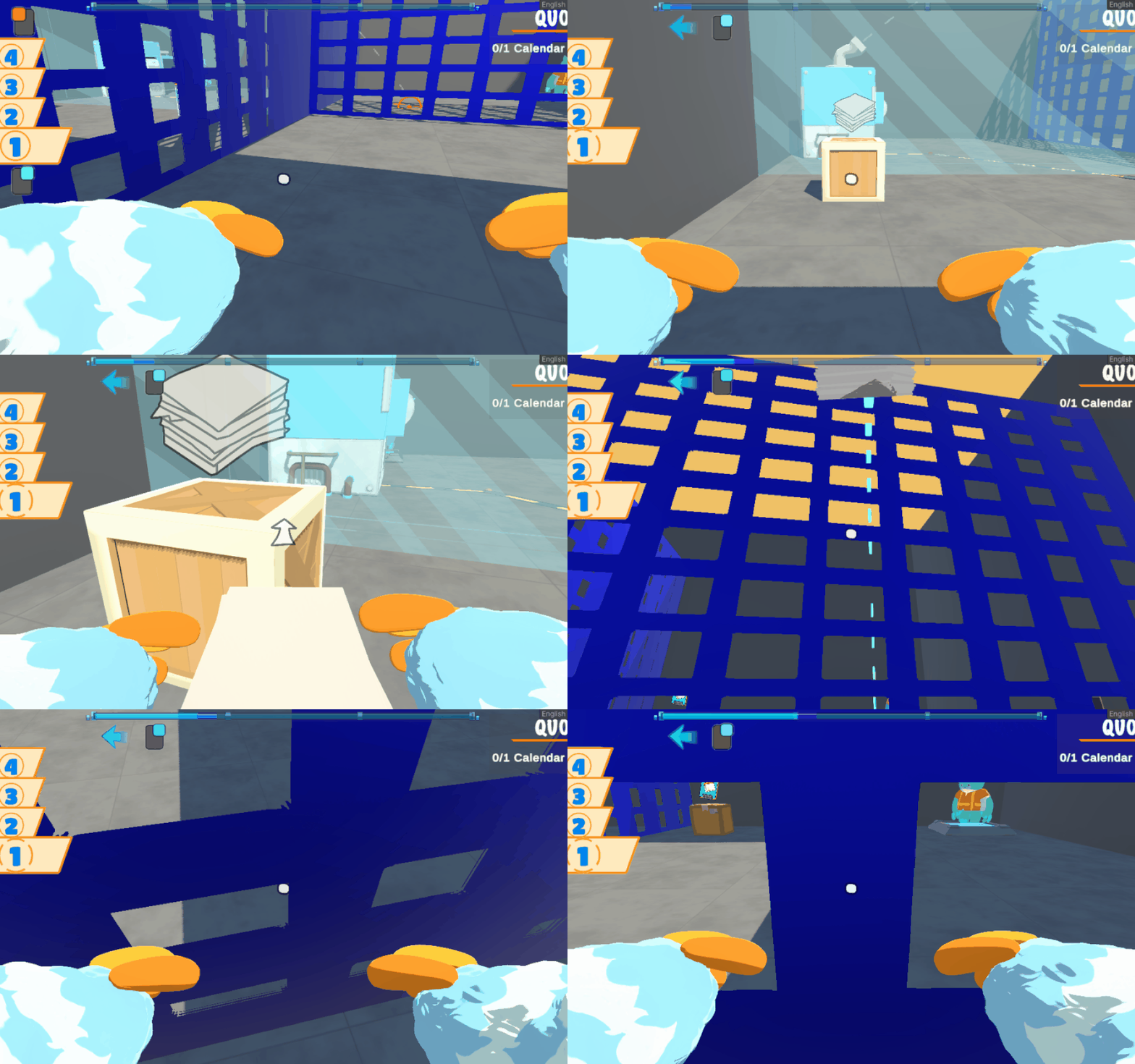
We quickly learned that building a level based game brought a massive overhead of design work. Thus, our designers encouraged the entire team to assist with the level implementing process. We’d held multi-hour level meetings, where designers presented concepts while programmers and technical artists would greybox them in real time.

Here is an example of initial designer mockup:

And here is what I would develop over the course of an hour:

During these sessions, I’d often have to quickly implement new functionality on the fly to make the levels playable. Here you can see the earliest implementation of the NET system– it blocks players but allows thrown items to pass through. The final version functions in reverse and can be projected dynamically across levels. For efficiency, I implemented the essential functionality during this session.

After initial greyboxing, we’d then exhaustively test and iterate on the greybox, before passing it off to the artists and set dressers, the final result looking like this:

Over the course of development, I greyboxed over a dozen levels, though only a few shipped in the final game. The process gave me a strong understanding of the hybrid designer & engineer role, as well as how to build efficient pipelines and workflows for level-based games.

Final UI - Timeworks

Timeworks has a lot of information it needs to communicate to its players subtly and effectively while their attention is occupied with the level at hand. The game’s UI went through countless iterations throughout development to accomplish this.

I was in charge of implementing several final UI designs, like the blueprint cards:

The crafting recipes drive the flow of each level, and are essential to players’ puzzle solving rhythm. So we experimented with several ways to communicate that information to the player, such as placing all crafting recipes in the pause menu. Ultimately, we decided it would be more engaging to show them diegetically during gameplay, with one example being the cards that appear at the start of each puzzle.

I also implemented the final loop tracker UI. It needed to communicate clearly what loop you were on, when loops would be overwritten, when you were changing loops, and what inputs controlled these actions. I used DOTween, custom C# event classes, and a Horizontal Layout Group to achieve this.

I also implemented the final loop tracker UI. It needed to communicate clearly what loop you were on, when loops would be overwritten, when you were changing loops, and what inputs controlled these actions. I used DOTween, custom C# event classes, and a Horizontal Layout Group to achieve this.

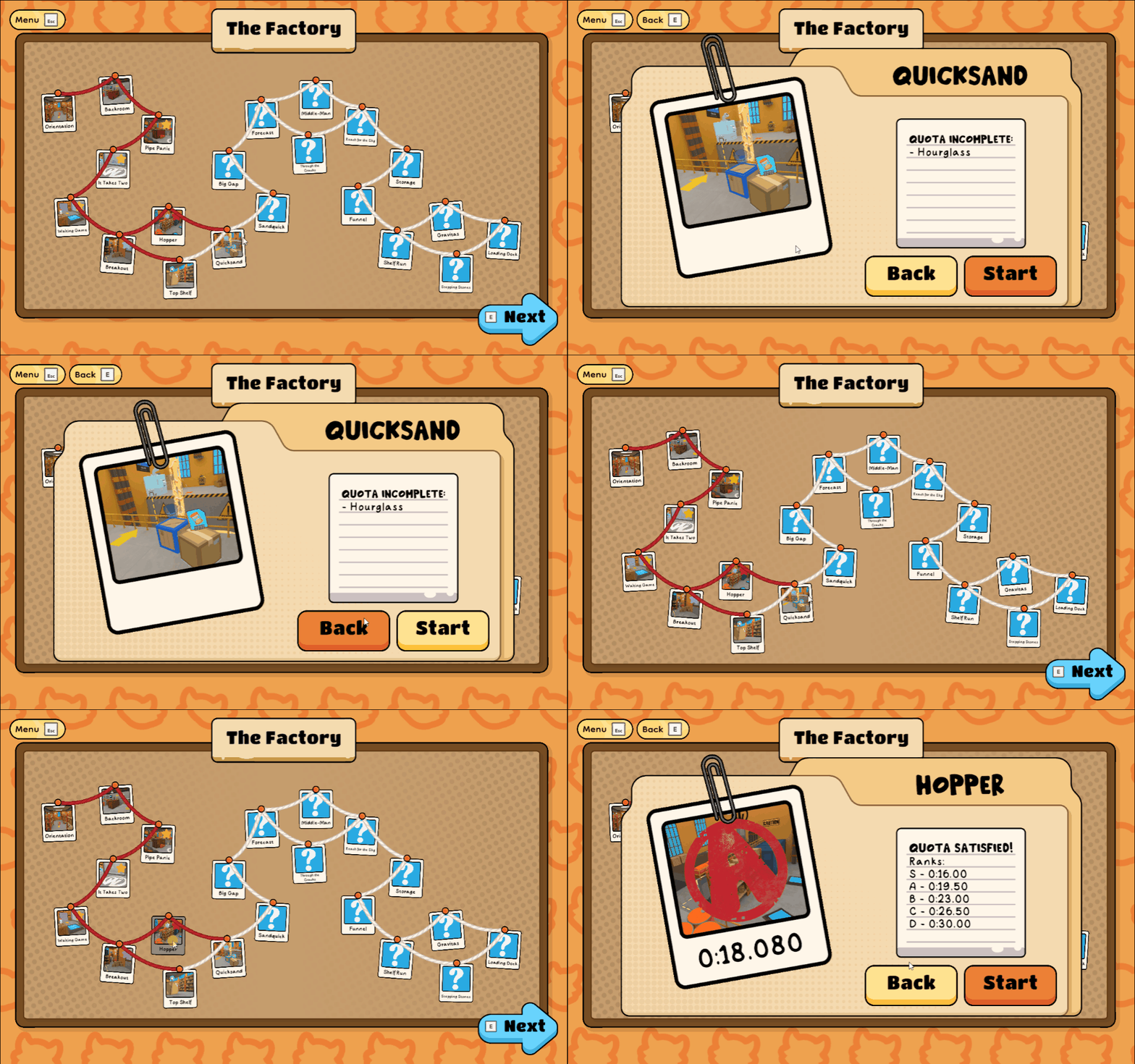
Finally, I led the design and implementation of the level select UI, iterating extensively before reaching our final version. I started with a mockup and user flow diagram:

I then began to iterate on the UI:


I initially implemented a basic design using a scrolling Layout group, but found it didn’t fit thematically with the corkboard-inspired aesthetic.


Here is what I finished for MAGfest 2024, using LineRenderer to create yarn connections between the levels.

I then discovered Alan Zucconi’s article about implementing catenaries and incorporated some of his math to create sag in our yarn lines.

Here is the final result:

The yarn changes color once levels are completed, and a colorful stamp appears over levels showing your rank. Each zone has their own themed board as well. This process taught me keep iterating until a design feels right, no matter how many revisions it takes.

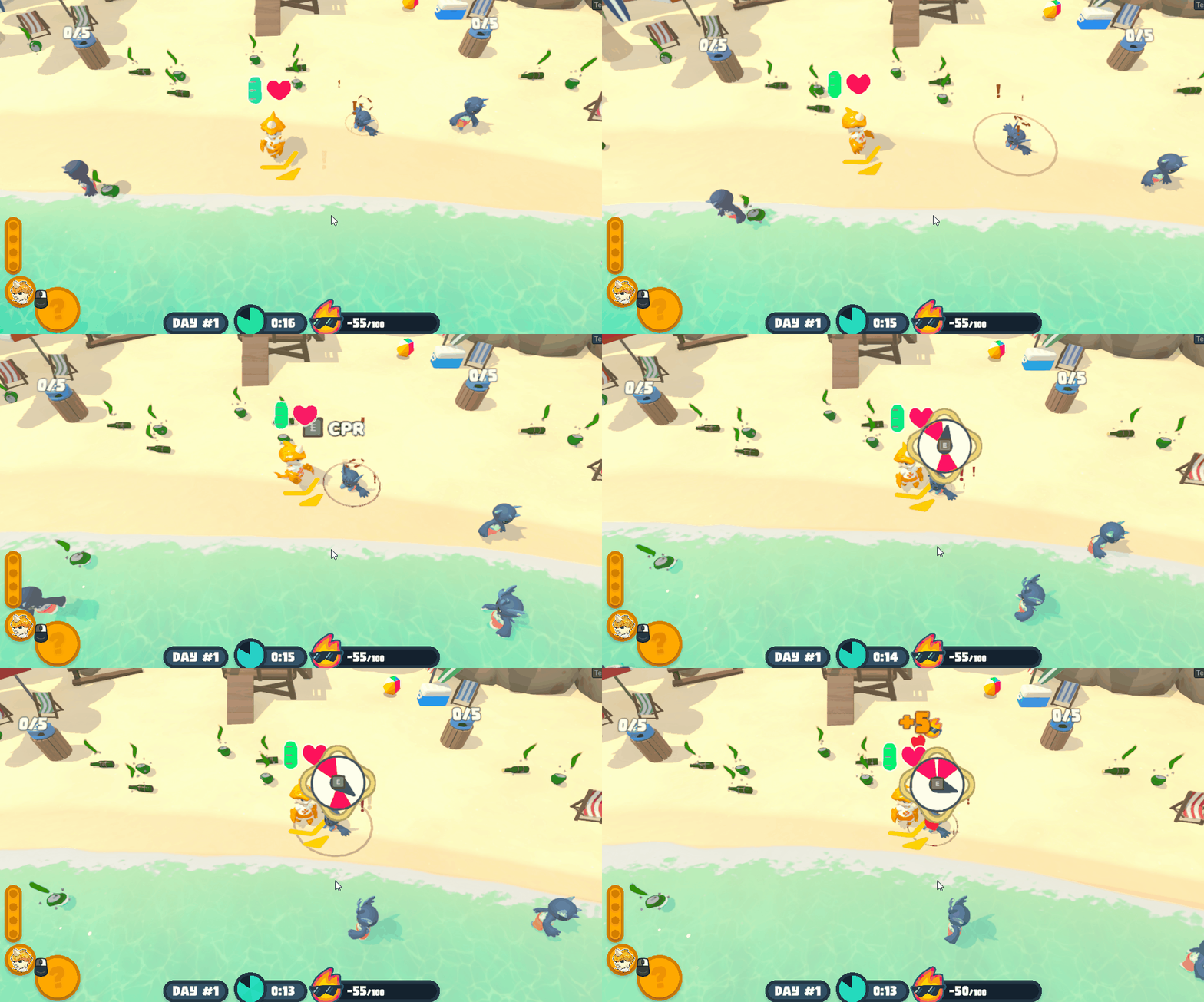
Throwing System - Boast Guards

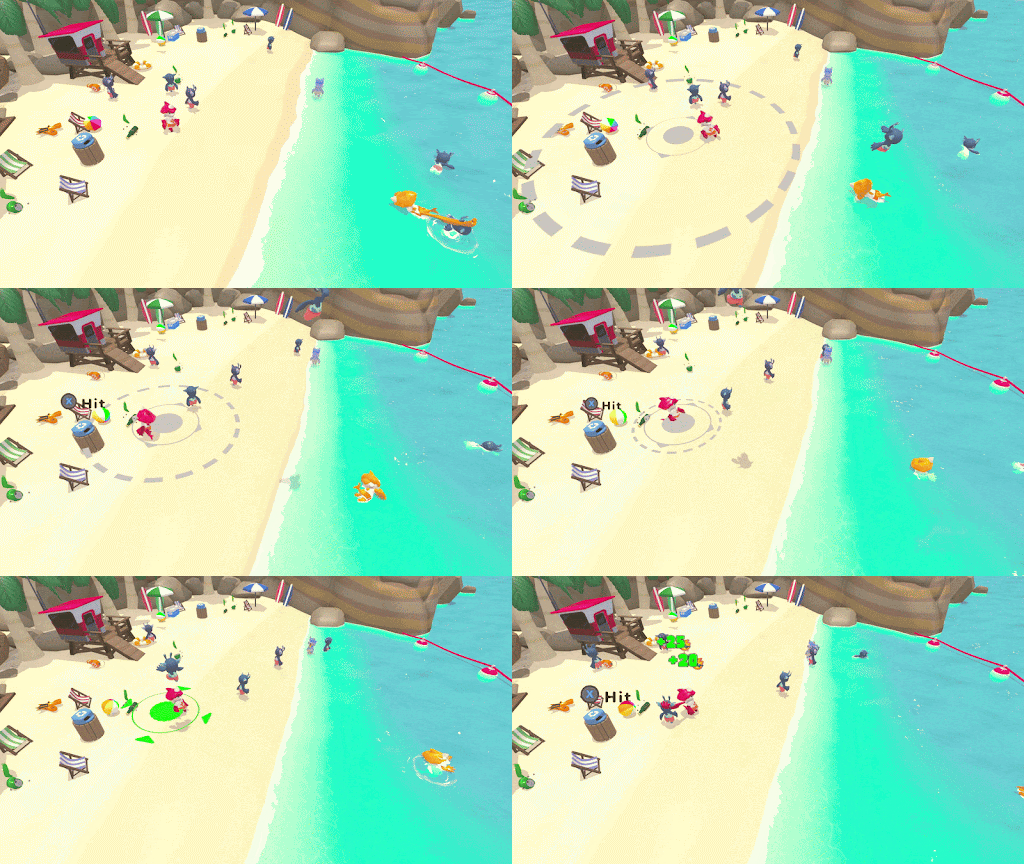
Rapid game development, while occasionally known to result in incredible games, can often allow large design problems to persist from pitch to release. After attending GDC2025, we were worried that Boast Guards had such a problem, with playtesters noting that the game didn’t incentivize co-op interactions as much as it should. With one month left until our senior capstone was due, we put our heads together to solve this design challenge.

The result was the throwing system, which I designed and implemented. It allows for players to throw the swimmers, giving another player the chance to gain extra points by catching. The system promotes communication, situational awareness, and most importantly cooperation. It was a challenge to implement considering it was a late addition to an established codebase.

I designed a prefab that could be given to any gameobject to allow it to be thrown. UnityEvents are used to trigger behavior at each point of the throw.

Methods can then be written in the object script. It was important to make the system flexible because of how far into development the game was, for example swimmers used NavMesh, Unity Behavior, and other systems that needed to be turned off while being thrown.

Methods on the swimmer script that are called at different points of the throw

The rest of the behavior is implemented in a custom "hoist state" on the player object.

I initially allowed our designers to set the throw force rather than the throw time. However, they requested the latter, so I changed the 3D math equation used.

The throw target then determines the amount of points the player will receive, and communicates that with appropriate UI tweens. The catching logic is checked in the player grabber script, awarding the proper amount of fame and ending the interaction.

The throw system was implemented in one month to coincide with our capstone presentation. The experience taught me how to design for game feel and to iterate often, especially within truncated development.

Interact System - Boast Guards

The first multiplayer system I implemented was the interact system. I designed it to be as future-proof as possible considering new features and eventual online multiplayer.

Methods on the swimmer script that are called at different points of the throw

Every interactable GameObject has a script of the same name, which other scripts on the object subscribe to. When the player initiates an interaction with a GameObject, an "Interaction" object is created, and passed along via an event to other scripts.

Since there might be numerous interactable objects near the player, I chose to use OverlapSphere() and sorting to find the closest interactable object.

With this system, new interactable objects were simple to fold into the existing system. This approach is very thorough, but I felt it was necessary to avoid multiplayer snags and edge cases. It definitely helped our team implement within a truncated development timeline.

Methods on the swimmer script that are called at different points of the throw